
Xbox Mode in Windows 11: Can a Gaming PC Become a Console in 2026?
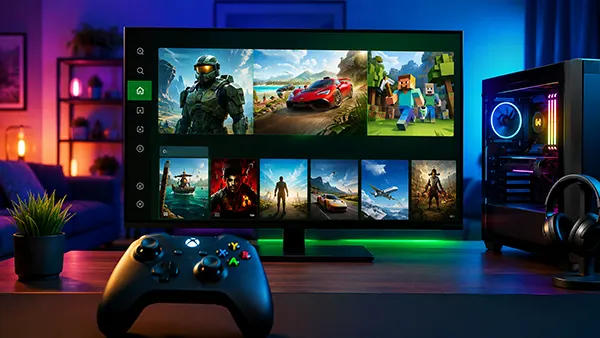
Windows 11 has moved noticeably closer to the way a games console is used from a sofa, television or controller-first setup. The main reason is Xbox mode, the full-screen gaming experience that Microsoft began rolling out to standard Windows 11 desktops, laptops and tablets on 30 April 2026 after earlier testing on handheld gaming devices. Instead of replacing Windows, Xbox mode creates a dedicated gaming environment over it, placing installed titles, recent games and controller navigation at the centre of the screen. The result can make an ordinary gaming PC feel much more like an Xbox during everyday play, but important differences remain. Hardware, game compatibility, Windows applications, third-party launchers and the underlying operating system still behave like those of a PC. Understanding that distinction is important when deciding whether Xbox mode can genuinely replace a separate console.
What Xbox Mode Actually Changes on a Windows 11 PC
Xbox mode is not a separate version of Windows and does not require a special Xbox-branded computer. Microsoft describes it as a console-inspired gaming experience integrated into Windows 11. As of August 2026, the feature requires Windows 11 version 24H2 or later and is available in supported markets. Microsoft started the broader rollout to desktops, laptops and tablets in April 2026, following the earlier full-screen experience introduced on Windows gaming handhelds. Availability has been delivered gradually through Windows updates, meaning two otherwise similar PCs may not have received the feature at exactly the same time during the rollout.
Once enabled, Xbox mode replaces the familiar desktop view with a cleaner full-screen gaming interface designed around a controller. Games and recently used titles are placed within easy reach, while normal desktop elements become far less prominent. On a standard PC, Xbox mode can be enabled through Settings under Gaming and Xbox mode. Microsoft also provides several ways to enter it, including the Xbox app, Game Bar and the Windows key plus F11 shortcut. Task View can be configured as another entry point. Returning to the normal desktop remains possible, so using Xbox mode does not lock the computer into a permanent gaming-only state.
The game library is particularly important because Microsoft is not limiting the experience to titles obtained directly through Xbox. Xbox mode can provide access to the Xbox Game Pass PC catalogue as well as installed games from leading PC stores. This approach reflects how PC gaming actually works: a player may have titles distributed across Xbox, Steam and other services rather than inside one closed collection. Xbox mode therefore acts primarily as a controller-friendly gaming home rather than replacing every launcher installed on the computer. The games are still PC games, and the software behind them continues to use Windows in the usual way.
How Close the Interface Feels to an Xbox Console
For someone using a gaming PC with a large television and an Xbox controller, the practical difference can be substantial. Traditional Windows navigation works well at a desk but becomes less convenient from several metres away because menus, icons and dialogue boxes were designed primarily for mouse and keyboard input. Xbox mode reduces that friction. A controller can be used to browse the gaming home screen, select titles and move between active games or applications. It gives a living-room PC a much more coherent interface without requiring the user to reach for a wireless mouse each time they want to choose another game.
Microsoft has also changed how applications appear while Xbox mode is active. Only one window is displayed at a time, and applications are shown full screen where possible. Programs that normally open several windows may display only the most recent one, while software that cannot use a full-screen layout can appear against a black background. Some normal desktop keyboard shortcuts are disabled in this state. These restrictions help remove much of the visual clutter associated with Windows, but they also demonstrate why Xbox mode should be considered a specialised Windows environment rather than an exact copy of the Xbox Series X or Series S interface.
Switching between software is handled through a controller-friendly version of Task View. A player can move between open games and applications with the controller sticks, shoulder buttons or keyboard and can return to the gaming home screen through Game Bar. This is especially useful when a PC is connected permanently to a television. However, third-party programs remain independent Windows applications. Their own account screens, updates, security messages or launch requirements do not cease to exist simply because Xbox mode is active. The experience is therefore much closer to console use than the traditional Windows desktop, but the PC remains visible underneath when an application needs conventional Windows interaction.
Does Xbox Mode Improve Gaming Performance?
Xbox mode should not be treated as a universal performance upgrade. It does not turn a mid-range graphics card into a faster one, increase processor performance or automatically raise a game’s frame rate. Resolution, graphics quality and overall performance remain dependent on the PC’s hardware, drivers and the individual game’s settings. The biggest immediate change on a normal desktop or laptop is the way the system is controlled and presented. A cleaner interface can make the computer feel more focused on gaming, but that subjective improvement should not be confused with a measurable increase in rendering performance.
Microsoft does document additional background-process management for gaming handhelds. When a supported handheld is configured to enter Xbox mode automatically at sign-in, Windows can limit background processes to improve gaming performance and battery behaviour. The company also allows some startup applications to be delayed until the user returns to the normal desktop. This is useful on compact devices where memory, battery life and processor resources have tighter limits. Microsoft does not make the same broad promise that simply enabling Xbox mode on an ordinary desktop PC will produce a specific frame-rate increase, so desktop users should keep expectations realistic.
There is still a practical advantage to reducing distractions. A conventional Windows gaming session may involve the taskbar, desktop notifications, open utilities and several launchers competing for attention. Xbox mode places gaming at the front and makes accidental interaction with desktop elements less likely. For players who simply want to switch on a PC, pick up a controller and start a game, that reduction in friction may matter more than a small performance difference. It changes the experience surrounding the game without changing the fundamental capabilities of the hardware running it.
What Happens to Other Launchers, Apps and Windows Features?
One of the strongest aspects of Microsoft’s 2026 approach is that Xbox mode does not require players to abandon the wider PC game library. Microsoft says its aggregated library can include the complete PC Game Pass catalogue alongside installed games from leading PC stores. This makes Xbox mode more practical for long-term PC users whose purchases may be spread across several accounts. Selecting a title from a unified gaming view is simpler than manually navigating separate desktop shortcuts, although the original launcher or account associated with a particular game may still be involved when the title starts.
Normal Windows applications can also remain available, but the full-screen environment changes how they are displayed. Software designed around several floating windows may feel less natural because Xbox mode shows one window at a time. Applications without proper full-screen support may appear with unused black space around them, while familiar minimise and maximise controls do not behave in the same way as they do on the desktop. This matters for players who routinely keep web browsers, communication tools, hardware monitoring software or other utilities visible next to a game. Xbox mode favours focused controller use rather than complex desktop multitasking.
The normal desktop is therefore never far away. Windows allows users to leave Xbox mode through Task View, Game Bar or the Windows key plus F11 shortcut. This is an important difference from a conventional console because the same machine can move quickly from gaming to office work, web browsing, media editing or other Windows tasks. A desktop gaming PC can spend the evening connected to a television in Xbox mode and return to a monitor-and-keyboard workspace the following morning. That flexibility is one of the main reasons Microsoft has kept Xbox mode inside Windows instead of trying to replace the normal desktop.
Can Xbox Mode Replace an Xbox Series X or Series S?
Xbox mode can replace some of the convenience associated with owning an Xbox, but it does not turn a Windows computer into an Xbox Series X or Series S. The consoles still use purpose-built hardware and system software with a more predictable environment across every compatible device. PC games can have different hardware requirements, graphics options, launchers and control arrangements. A Windows PC also does not automatically gain access to every Xbox console game merely because Xbox mode is enabled. The feature changes how games are presented and launched; it does not remove the distinction between a PC version and a console version of a title.
The boundary did become less rigid in July 2026. Microsoft introduced Xbox Backward Compatibility on PC in an early release, initially bringing four original Xbox titles to PC and supported handhelds: BLiNX: The Time Sweeper, Conker: Live and Reloaded, Crimson Skies: High Road to Revenge and Fuzion Frenzy. Eligible digital licences purchased previously for these games on Xbox can carry over to PC through the same Microsoft account. Microsoft also states that physical original Xbox discs cannot be used to unlock the PC versions. This is a meaningful change, but four supported classics clearly do not amount to the complete historic Xbox catalogue.
Xbox Play Anywhere further reduces the separation for supported modern games. Where a title participates in the programme, a digital purchase can cover both Xbox and Windows PC versions, with compatible saves and progress moving between devices. Microsoft stated in March 2026 that the Xbox Play Anywhere catalogue had grown beyond 1,500 games. That makes a Windows gaming PC considerably more useful to someone already invested in Xbox purchases and Game Pass. Even so, support is decided game by game. Titles without a PC version or the appropriate Xbox Play Anywhere support do not automatically become locally playable simply because the computer is running Xbox mode.
Who Benefits Most from Xbox Mode in 2026?
The most obvious audience is anyone using a Windows gaming PC as a living-room machine. A small desktop connected to a television can now start a gaming session without exposing the full Windows desktop for most routine actions. Controller navigation, a full-screen game library and quick switching between active software address several of the inconveniences that traditionally made PCs less comfortable than consoles from a sofa. Gaming laptops can benefit for similar reasons when connected to a television in a hotel, bedroom or shared living space. Handheld devices remain another natural fit because small screens make traditional desktop navigation particularly awkward.
Players who spend most of their time at a desk may see a smaller change. Mouse-and-keyboard users already have fast access to Windows shortcuts, launchers, browsers and multitasking, so a full-screen controller interface solves fewer problems for them. People who stream gameplay, run several communication tools or frequently adjust PC utilities may also prefer the standard desktop for many sessions. Xbox mode is optional, which makes this less of a compromise: it can be used when a controller-focused session makes sense and left when normal PC navigation is more efficient.
In practical terms, Xbox mode makes a gaming PC behave more like a console without making it one. By August 2026, Windows 11 can offer a controller-first home screen, access to games from several PC libraries, fast movement between gaming and the desktop, Game Pass integration and an expanding connection with the wider Xbox catalogue. What remains unchanged is equally important: the computer still runs Windows, still depends on PC hardware and PC versions of games, and still retains the complexity and freedom associated with PC software. For a user who already owns a capable gaming computer, Xbox mode can reduce the need for a separate console in some situations. It does not make the two devices technically identical.
Similar articles
-
 Wireless Graphics Card over Wi-F...
External graphics have traditionally meant accepting a cable. …
-
 Letter Pirate: How Competitive M...
Letter Pirate takes a familiar word-game idea and …